DESIGN × HUMAN × AI
Lina Dong’s
Product Design
Portfolio
Senior Product Designer · AI-Native Product Experiences
14 years of experience designing consumer and complex digital products,
including 3 years focused on AI-native product experiences.
Former Head of Design at Mootion, leading
0-to-1 generative AI product experiences from concept to launch.
Lina Dong · 董丽娜
Adobe → Alibaba Health → Mootion AI
Central Academy of Fine Arts (CAFA)

SELECTED PROJECT / 01
Mootion.com
Agentic AI Video
Creation Platform
A multimodal AI creation platform that turns ideas and source content into complete video stories through coordinated AI workflows.
Shipped in production · 2M+ creators · 50+ countries
Read the Autoflow case studyVisit Mootion
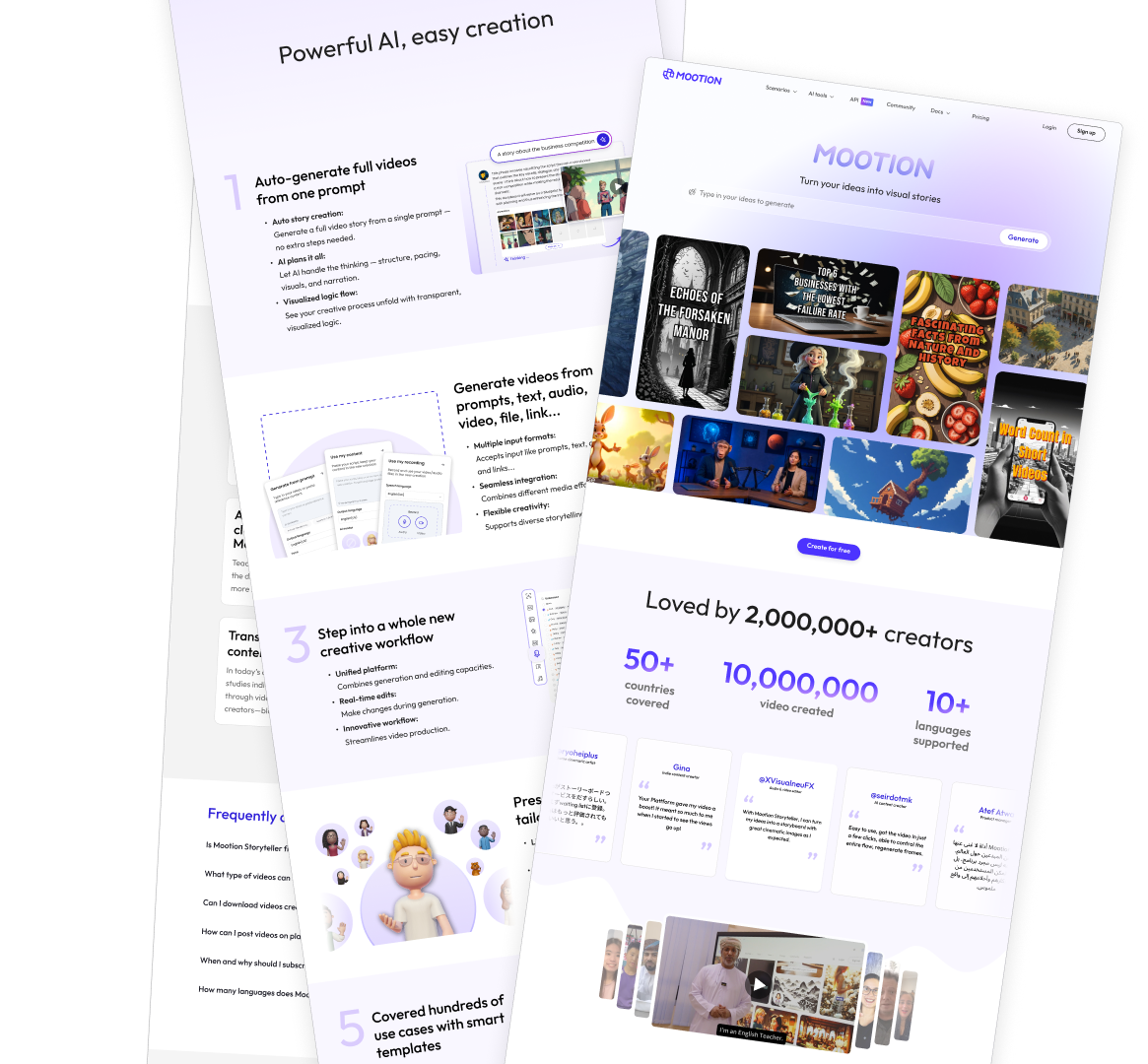
01 / AGENTIC WORKFLOWS
Designing Control for a Multi-Agent AI Workflow
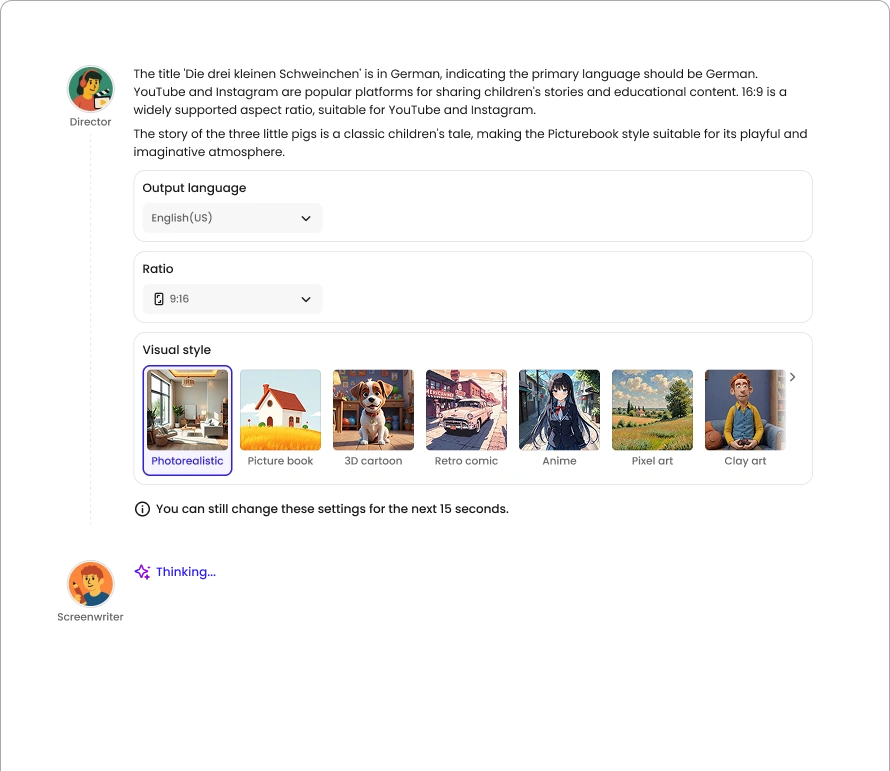
Let AI configure key video-generation parameters while keeping users in control.
- Intent-driven configurationAI agents automatically configure key video-generation parameters based on user intent.
- Clear interaction statesEditable and locked states are visually differentiated, so users always know when they can intervene.
- Visible progressExplicit system states such as “Thinking…” make progress visible during long-running generation.
- A window for interventionA short adjustment window lets users override AI decisions without interrupting the generation flow.
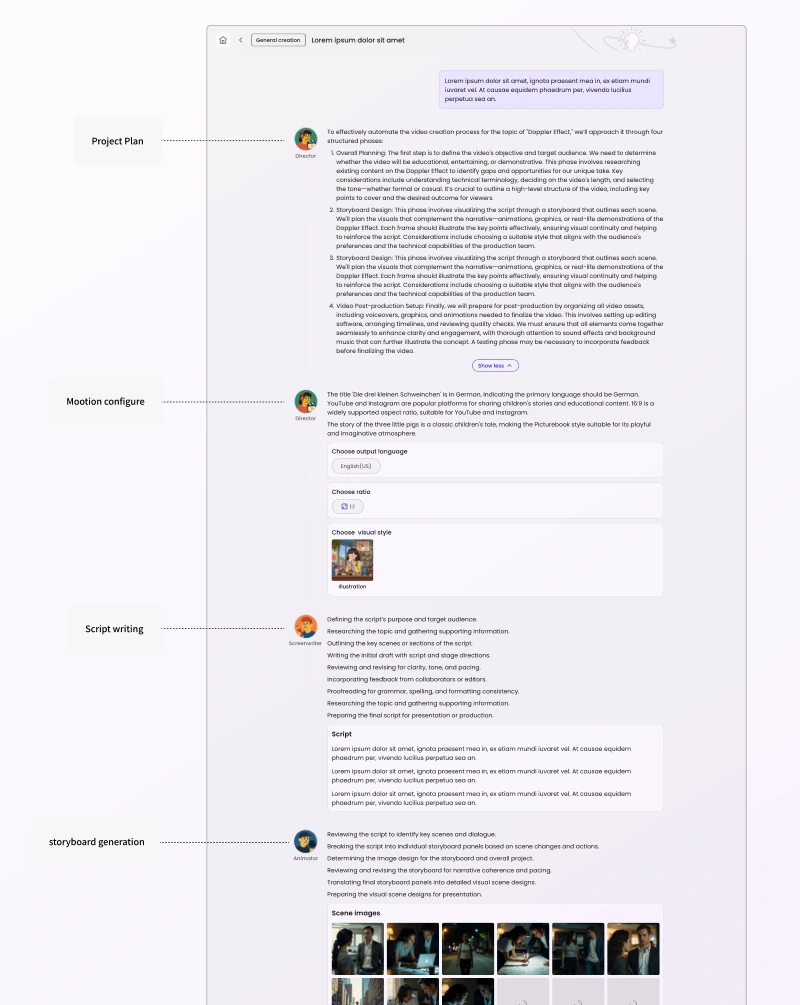
02 / MULTI-AGENT COLLABORATION
Role-Based Multi-Agent Workflow
Turn waiting into observable progress.
- Specialized responsibilitiesSpecialized agents take ownership of planning, scriptwriting, storyboarding, animation, and editing.
- A conversational activity streamInstead of hiding long-running AI work behind a loading screen, intermediate outputs are surfaced through a conversational activity stream.
- A continuous sense of progressThis makes the generation process understandable and gives users a continuous sense of progress.
Autoflow redesign~30% → ~60%Video completion after the redesign
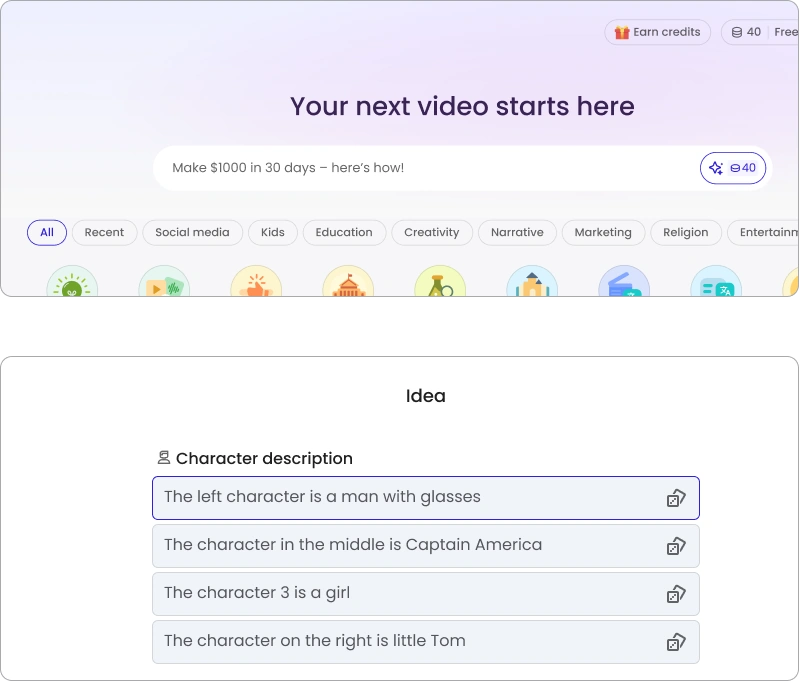
03 / PROACTIVE GUIDANCE
Capability Discovery Through Proactive Suggestions
Help users discover what they can create at the moment they need inspiration.
- Contextual starting pointsSurface contextual prompt starters as users explore the workspace, enabling one-click entry into creation flows.
- Discover through examplesUse example prompts to reveal what the product can create—including longer-form stories—without requiring users to understand the full feature set first.
- Lightweight guidanceOffer lightweight inspiration at the point of need, reducing onboarding friction without interrupting the main workflow.
04 / CREATION TEMPLATES
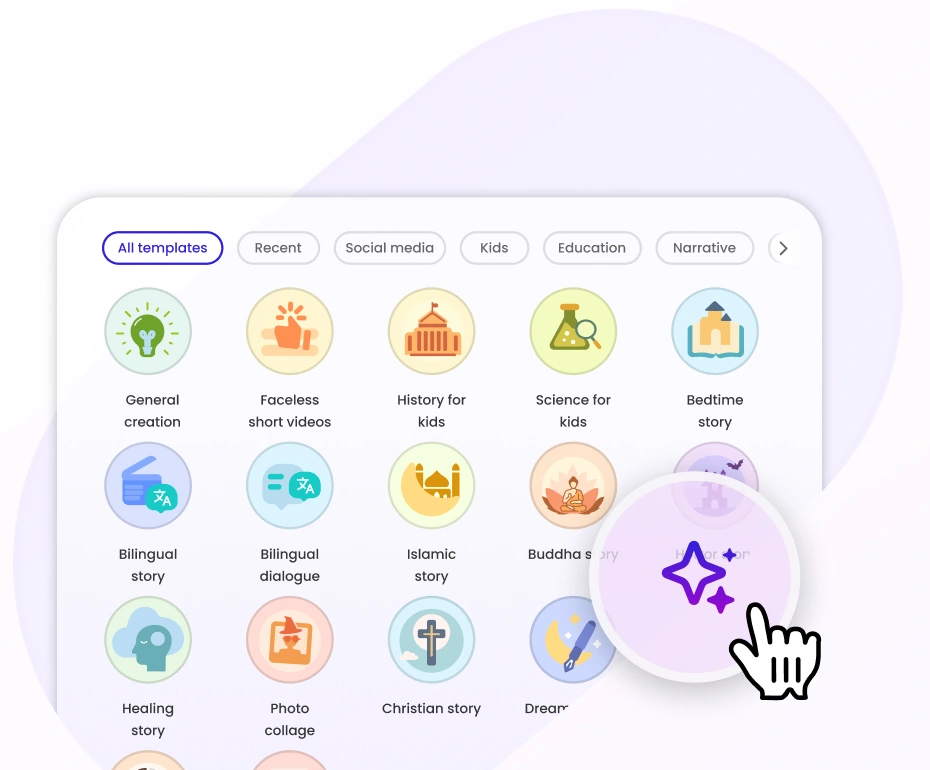
Capability Discovery Through Scenario Templates
Map common user intents to ready-to-use creation setups.
- Ready-to-use setupsScenario-based templates map common user intents to ready-to-use creation setups.
- Less prompt-writing effortThey reduce the effort of prompt writing while showing users the range of outcomes the product can generate.
- Different goals, one interaction modelDifferent templates encode different creation goals, enabling diverse outputs through a consistent interaction model.
05 / PROGRESS & FEEDBACK
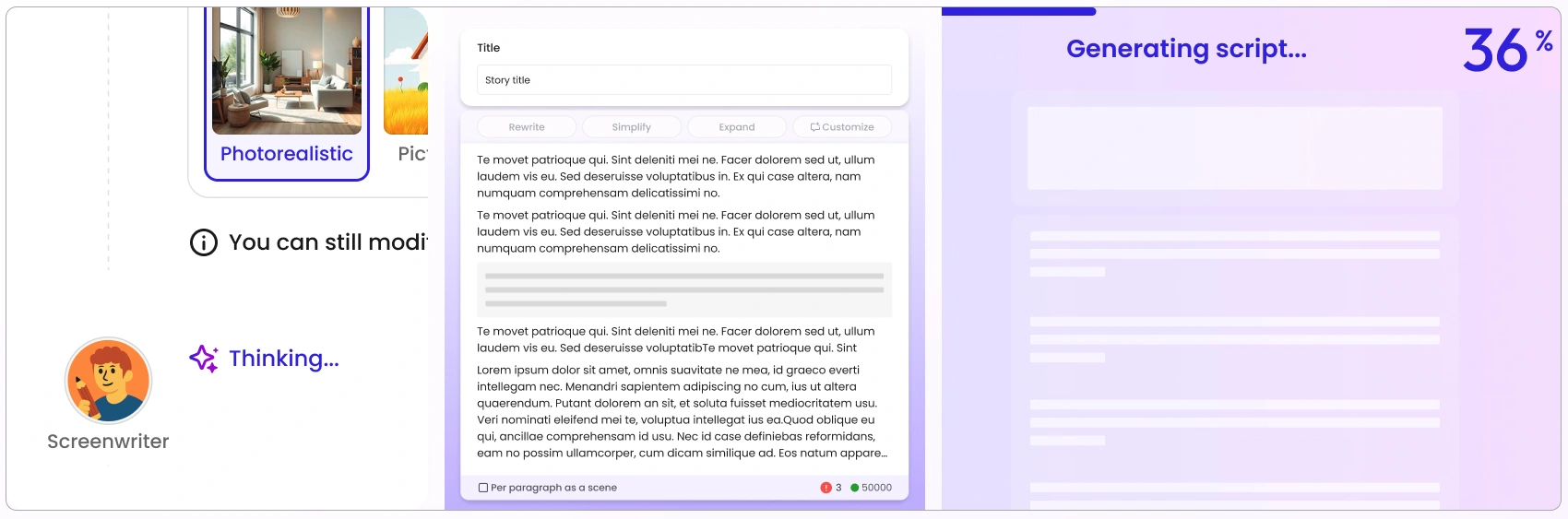
Skeleton States & Progressive Streaming
Provide immediate feedback while generation is underway.
- Immediate feedbackUse skeleton states to preserve layout and provide immediate feedback while content is being generated.
- Progressive streamingStream generated content progressively instead of waiting for the entire response to complete.
- Support longer tasksFor long-running tasks, communicate delays clearly and allow users to continue working elsewhere.
06 / MULTIMODAL CREATION
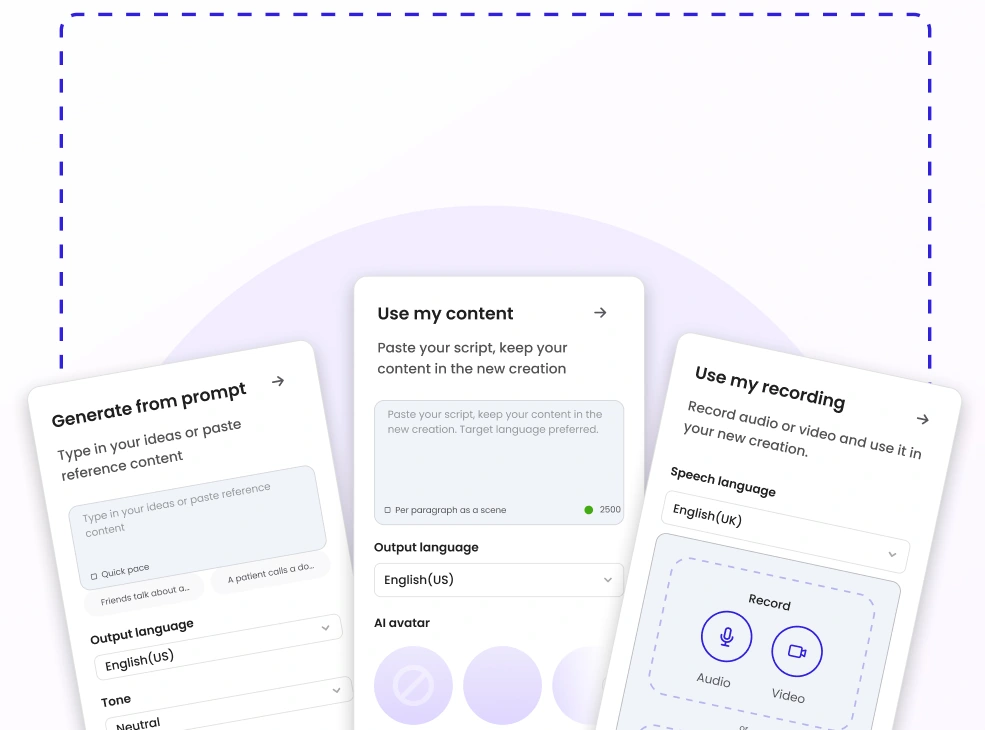
Multimodal Input: One Creation Flow, Multiple Input Types
Bring different source materials into a unified generation workflow.
- Flexible input methodsSupport text, audio, video, files, links, and direct recording within the same creation flow.
- A unified workflowBring different input types into a unified generation workflow, reducing context switching between tools and modes.
- Start from the sourceLet users choose the input method that best matches their source material and storytelling intent.
07 / AI-ASSISTED WRITING
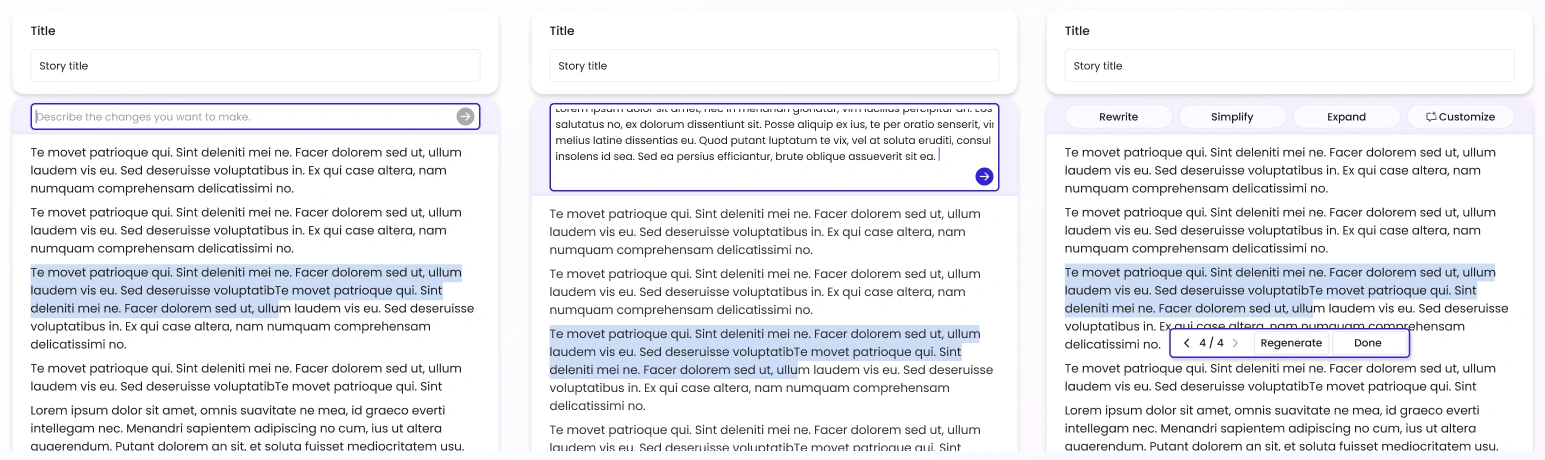
AI-Assisted Script Editing
Refine source content before committing to video generation.
- An editable starting pointTurn pasted or uploaded source content into an editable script before generation begins.
- Natural-language and quick actionsUsers can refine content through natural-language instructions or quick actions such as Rewrite, Simplify, Expand, and Customize.
- Editing in contextEditing stays within the creation flow, allowing users to refine content before committing to downstream generation.
08 / PRECISE IMAGE EDITING
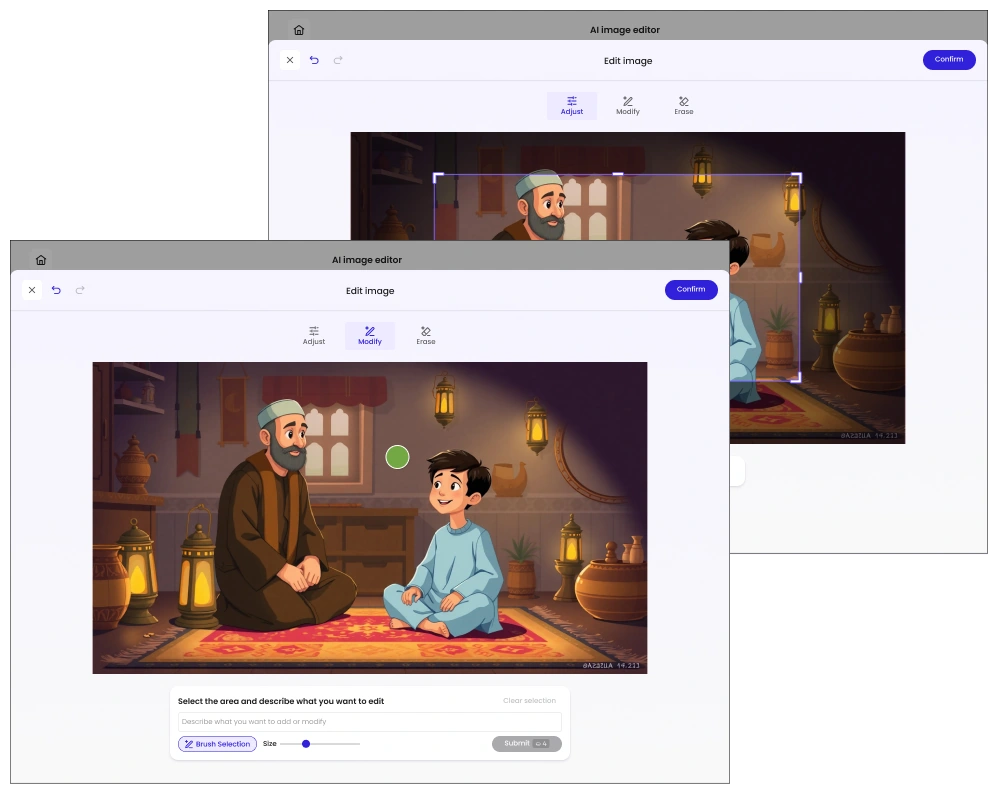
Region-Based AI Image Editing
Combine AI capabilities with precise user control.
- Define the regionLet users paint a precise region to define what AI should modify while preserving the rest of the image.
- A consistent editing patternMap different editing intents to the appropriate AI capability within one consistent interaction pattern.
- Precise controlThis combines model capability with precise user control, reducing unintended changes to the image.
09 / INTERNATIONALIZATION
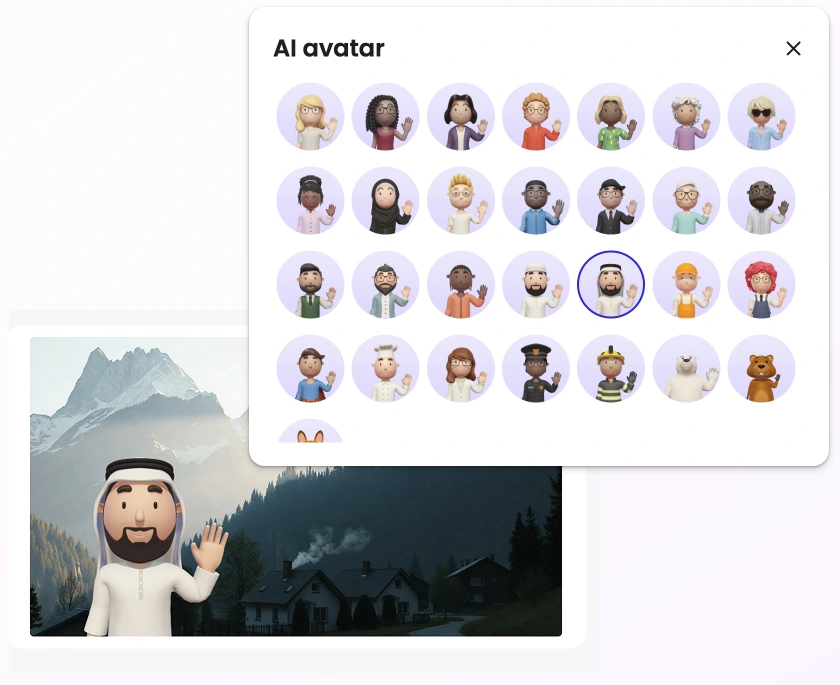
Right-to-Left (RTL) & Cultural Adaptation
Adapt the product to language conventions and cultural context.
- Right-to-left interactionAdapt navigation, alignment, and content flow for right-to-left languages.
- Language-aware outputValidate LLM-generated content against language-specific conventions rather than relying on direct translation alone.
- Cultural representationExtend character and visual presets to better reflect regional and cultural contexts.
- Sensitive visual generationIntroduce safeguards for culturally or religiously sensitive visual generation.
10 / INTERNATIONALIZATION
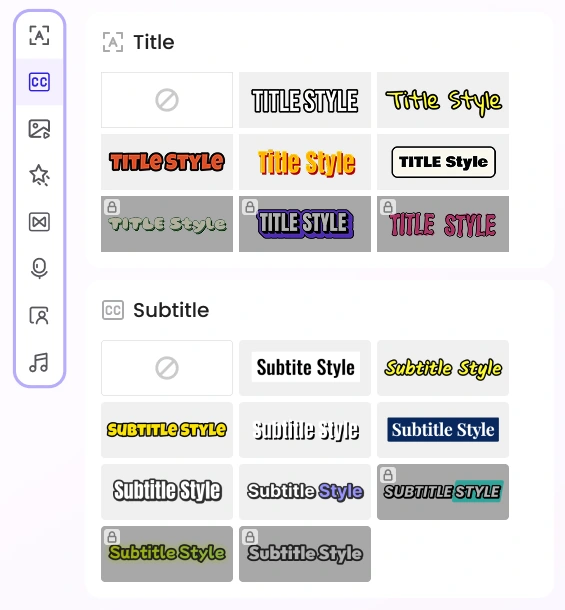
Multilingual Subtitle System
Maintain readability across writing systems and bilingual content.
- Language-specific typographyDefine language-specific typography and subtitle presets to maintain readability across different writing systems.
- Bilingual contentSupport bilingual subtitle layouts for multilingual content.
- Emphasis and readabilityProvide optional animation and word-level highlighting for emphasis and readability.
- A reusable asset libraryStructure subtitle assets as a reusable library, creating a scalable foundation for localization without interrupting the core workflow.
11 / INTERNATIONALIZATION
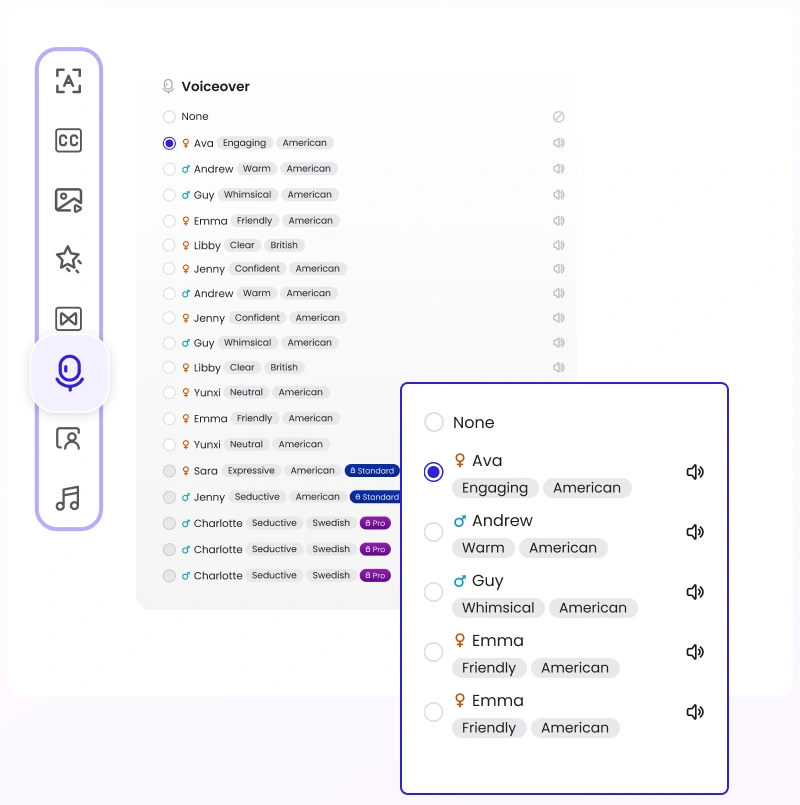
Voiceover & Background Music
Make localized audio options easy to discover and compare.
- Scannable voice presetsOrganize voice presets by language, accent, tone, and persona, making localized narration options easy to scan and compare.
- Connected audio controlsKeep voiceover and audio controls within the same creation environment to reduce context switching.
- Room to scaleDesign the asset model to scale across standard and premium options without changing the core interaction pattern.
- One audio workflowSupport audio preset selection within the same panel, enabling localized narration and soundtrack choices in one workflow.
12 / INTERNATIONALIZATION
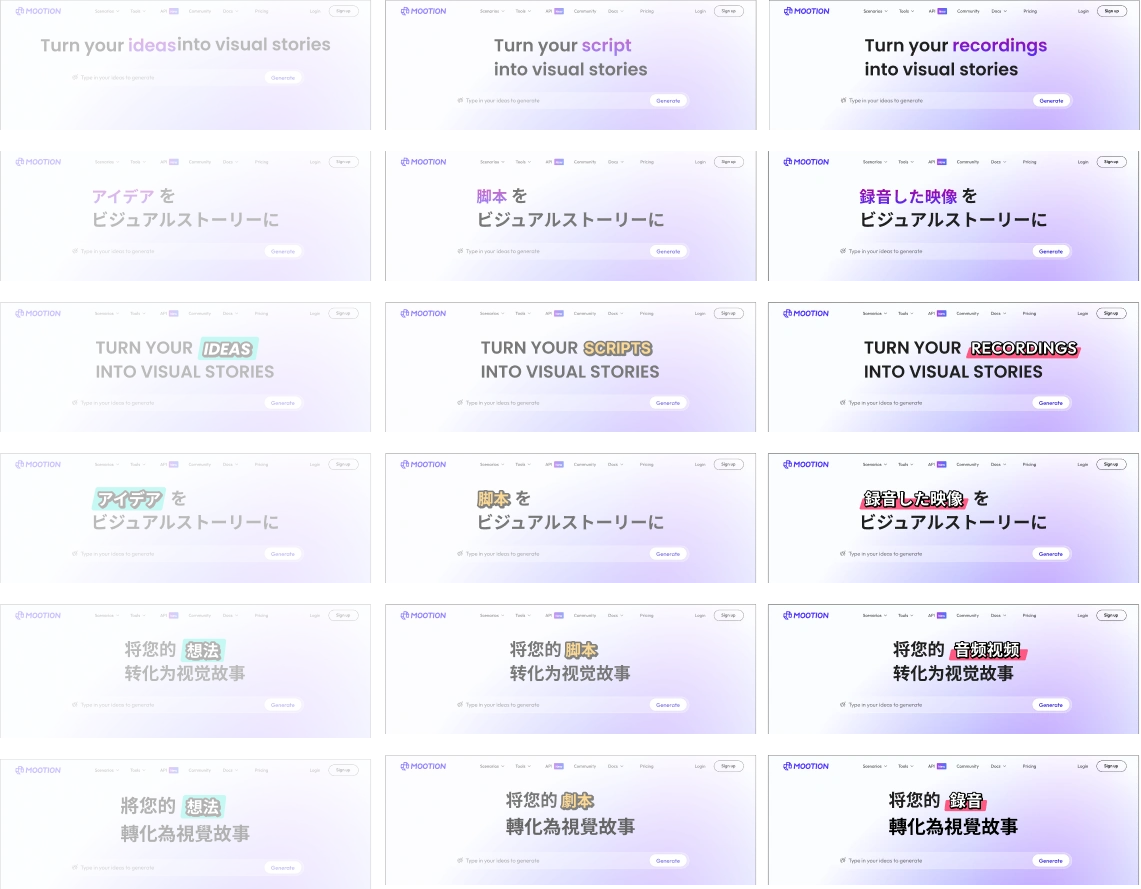
Adaptive Landing Page Localization
Adapt messaging and layout across English, Japanese, Simplified Chinese, and Traditional Chinese.
- Localized headline structuresLocalize headline structures across English, Japanese, Simplified Chinese, and Traditional Chinese rather than translating word for word.
- Consistent visual hierarchyAccount for differences in word order, string length, and line breaks while preserving the same visual hierarchy.
- Flexible layout rulesUse flexible layout rules so dynamic concepts such as ideas, scripts, and recordings can scale naturally across languages.
13 / CROSS-PLATFORM DESIGN SYSTEM
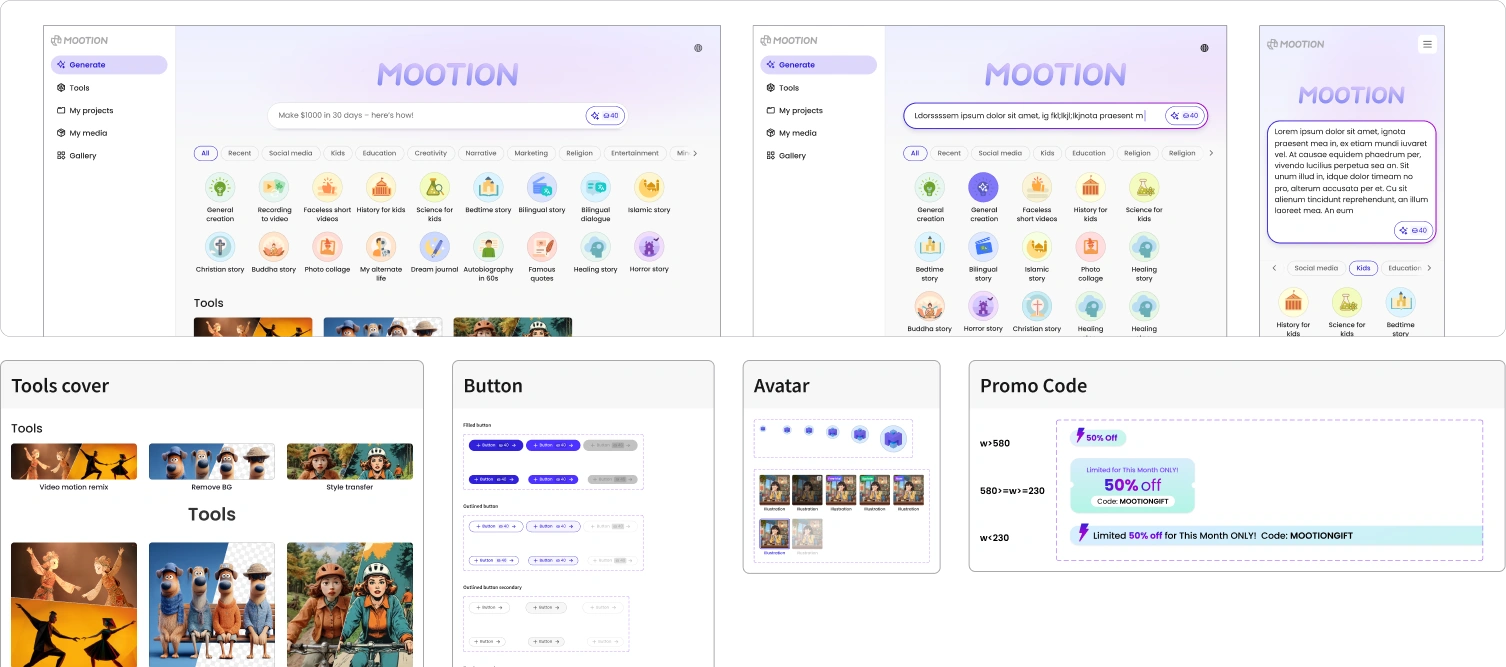
Cross-Platform Design System
Maintain consistency across product surfaces, interaction states, and feedback patterns.
- Shared foundationsBuilt a shared design system to maintain consistency across product surfaces, interaction states, and feedback patterns.
- Reusable componentsStandardized reusable components for navigation, buttons, inputs, popovers, loading, errors, and promotional states.
- Responsive specificationsDefined responsive behavior and implementation specifications to reduce design-to-engineering drift.
14 / FIRST-RUN EXPERIENCE
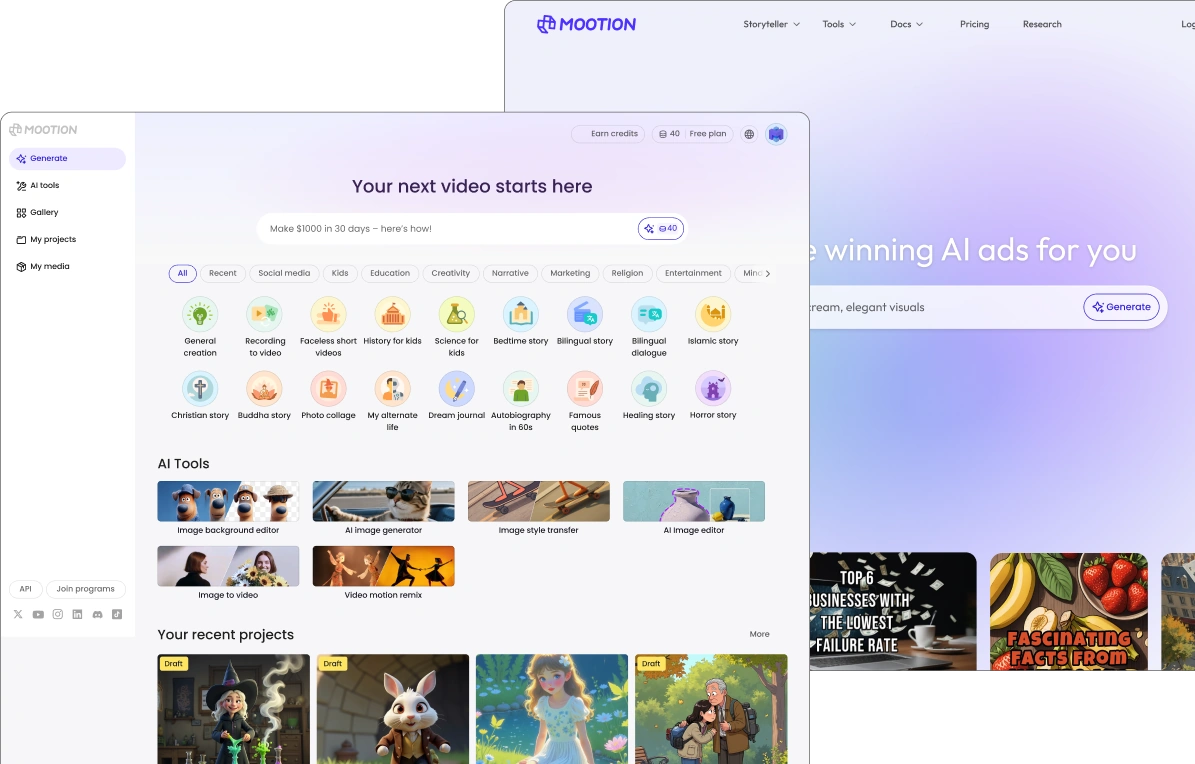
Designing the First-Run Experience
Give new users a clear path into creation.
- An immediate first actionGive first-time users a clear primary action and example prompts so they can start creating without learning the entire product first.
- Progressive discoveryProgressively surface popular scenarios and AI tools, balancing capability discovery with cognitive load.
- A workspace to return toKeep recent projects visible so the same workspace works naturally for both first-time and returning users.
15 / EMPTY & ERROR STATES
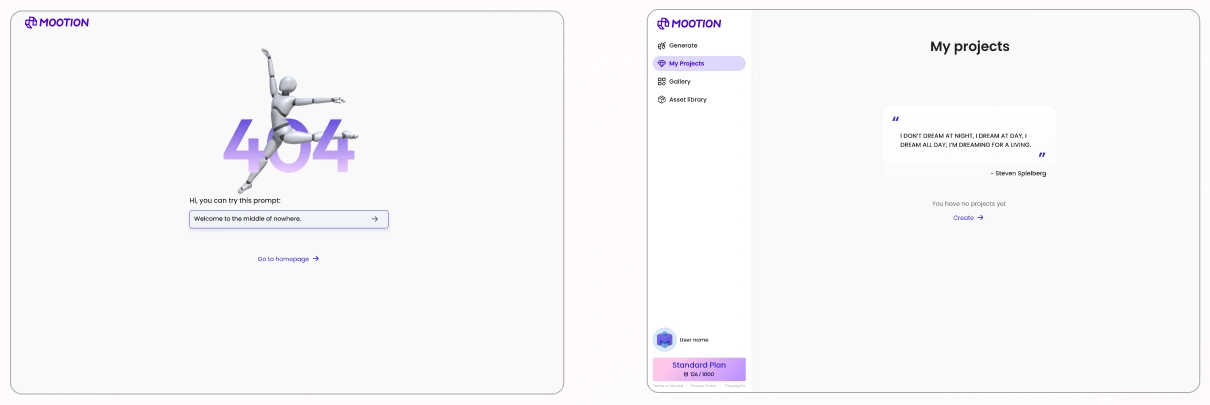
Empty & Error States
Explain what happened and provide a clear next action.
- A clear next actionUse error states to explain what happened and always provide a clear next action.
- Direct recovery pathsKeep recovery paths direct: create a project, return to the homepage, or continue with a suggested prompt.
- Lightweight onboardingTurn empty states into lightweight onboarding with a suggested prompt or creation entry point.
Lina Dong
AI can be probabilistic.
The experience shouldn’t feel unpredictable.